You have an app idea and want to execute it. You have already thought about what your app is offering and who your target audience is. You are even thinking about how to make this Android app a success in the graveyard of failed Android apps.
But one question keeps lingering in the background every time you think about your Android app idea. And that is, what exactly does an Android app cost to compete in today’s market? After all, creating an Android app is not just about writing code. It’s a combination of app strategy, user experience, security, infrastructure, and costs.
In this guide, we will answer the million-dollar question (not literally) of how much an Android app costs. We will discuss the factors that affect Android app cost in detail. Read till the end to get an overview of the hidden expenses and practical tips to reduce the cost of Android app development. Let’s dive in!
Why Businesses Invest in Android Apps?
If you want to reach millions of users worldwide, Android apps are the way to go. Globally, Android is the most popular mobile OS. It has about 71 percent of the market, while iOS has around 29 percent. Its range of affordable devices and variety of devices make it very popular in regions like Asia and Africa. Android has nearly 4 to 4.5 billion active users, which gives businesses access to a huge audience.
Many companies are investing in Android applications because they help connect with customers, increase brand visibility, and create new revenue streams. Apps just make it easier for businesses to give users personalized experiences, track what people need, and manage services directly through their phones.
In today’s world, having an Android app is no longer just a nice extra. While iOS users may spend more per app, the huge number of Android users makes this platform ideal for businesses that want to reach as many people as possible.
Factors That Affect Android App Development Cost
The cost of making an Android app depends on various factors. There is no fixed price because every app is different. The final cost changes based on what the app does, how it looks, and how it is built.
Complexity of the App
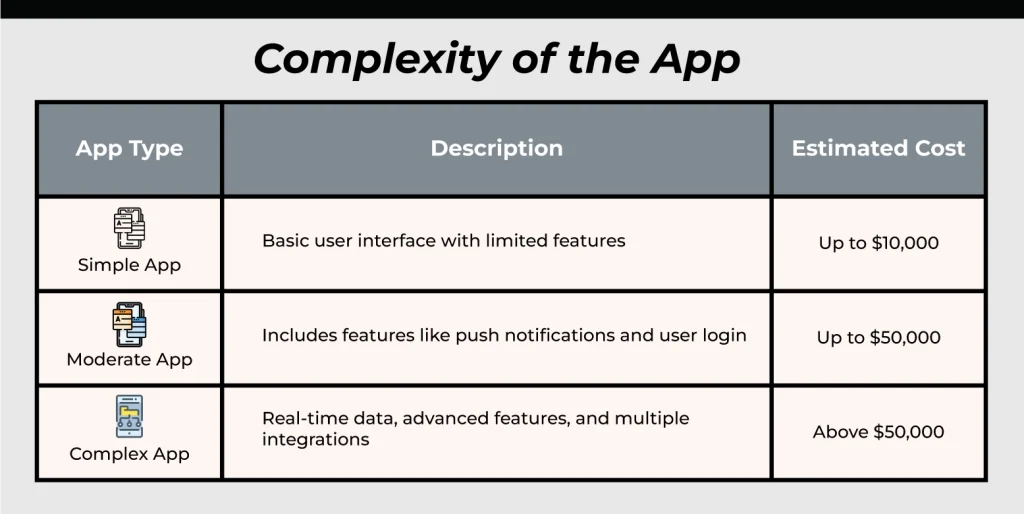
Android app complexity plays a big role in development cost. The more features and technical requirements an app has, the higher the cost will be. A complex app takes more time to develop. More time means a higher budget. A simple app takes less time, so the cost stays lower.
Complex Android apps usually include third-party tools, multiple backend services, admin panels, and custom system setups. These apps often handle real-time data and user interactions. Simple apps, on the other hand, usually show basic information and have only a few screens.
Below is a general cost estimate based on app complexity. These numbers can change depending on location, team size, and feature depth.
Design Requirements of the App
Design is another major part of the Android app development cost. Research shows that design can take up around 20 to 25 percent of the total app budget. This stage mainly focuses on the user interface and user experience.
The cost of design depends on how complex the app looks and feels. Apps with simple layouts and basic screens usually cost less. Apps with custom layouts, animations, and detailed user flows need more time and a higher budget.
Using ready-made templates can also lower design costs. These templates work well for simple apps. Custom designs, however, require more effort and planning. This increases the overall cost but helps create a better and more unique user experience.
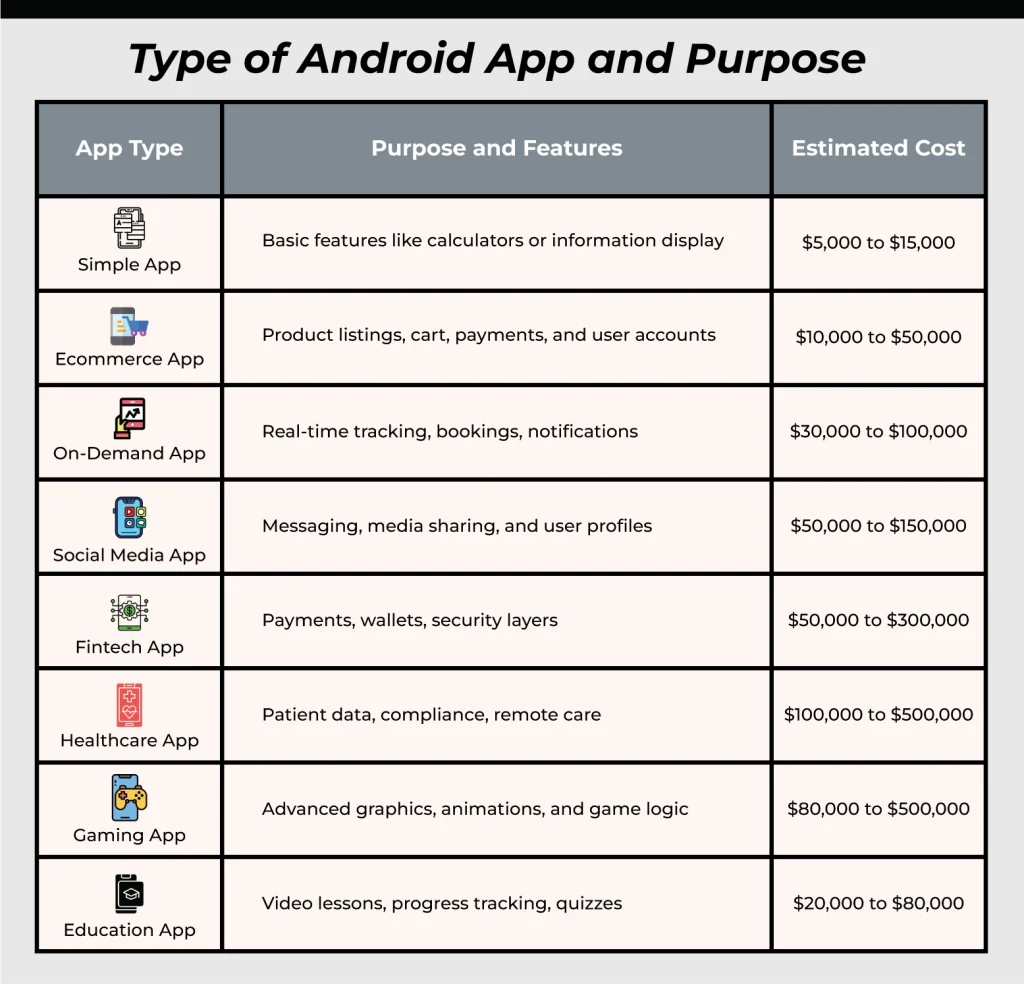
Type of Android App and Purpose
The type of Android app you plan to build plays a big role in the total cost. This decision usually happens during the discovery stage. On average, the discovery stage takes about 10 to 15 percent of the overall project budget. During this phase, the app idea is defined, features are planned, and the app is placed into a specific category.
Different app types need different levels of effort, tools, and technology. Because of this, their development costs also vary.
Development Platform and Tech Stack
The platform you choose can change how much your Android app costs. Native Android apps use Kotlin or Java. They run smoothly and work well with all Android features. Because of this, they usually cost more.
Cross-platform apps use the same code for Android and other platforms. This can save money. The trade-off is sometimes in performance or customization of the app.
The technology your app uses can really change how much it costs. Adding things like payment systems, maps, social logins, or chat features takes extra work. Even push notifications, analytics, or connecting with wearable devices add more time. Every new feature you add means more testing, more maintenance, and a higher overall app budget.
Data storage and cloud services also play a role. Most Android apps handle a lot of information, so setting up servers, databases, backups, and cloud hosting costs extra. If your app deals with sensitive data, like in healthcare or finance, you also need encryption and security measures. That adds even more to the total cost.
Team Choice
Where you hire your developers can make a big difference in the cost of your Android app. Developers in the US or Western Europe usually charge more than developers in Eastern Europe or India. Hiring freelancers can save money, but working with an Android app development company often makes the process easier and more reliable.
Once the app is launched, the costs do not stop. Regular maintenance, updates, bug fixes, and testing for different devices are necessary to keep the Android app working well. These ongoing tasks should be part of your budget from the start.
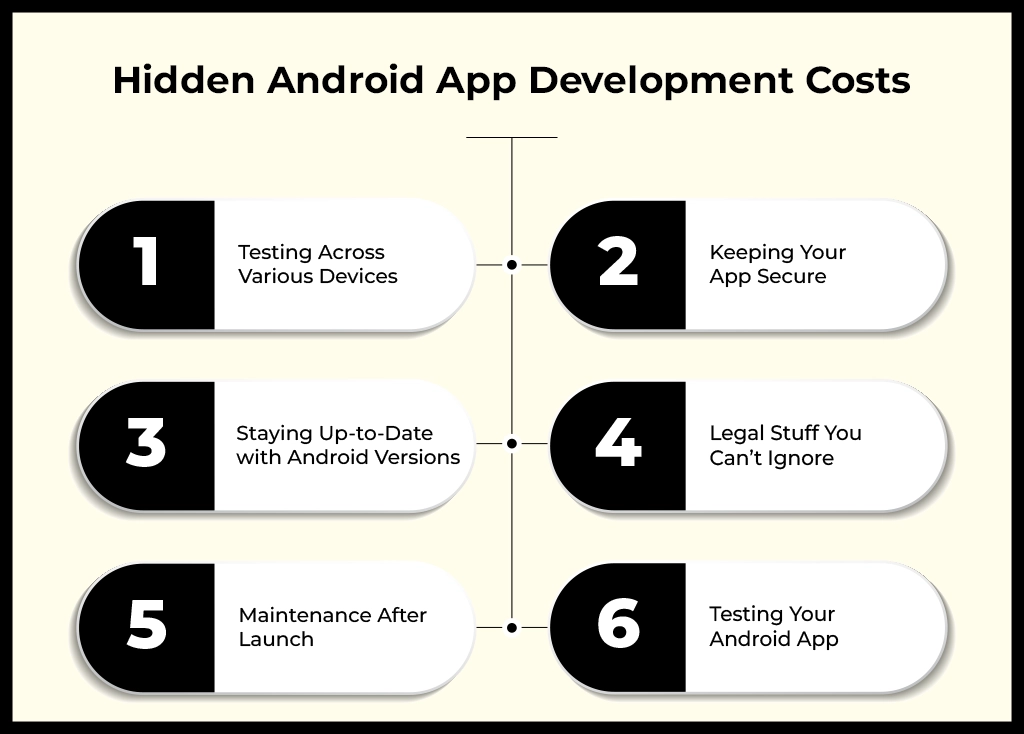
Hidden Android App Development Costs
When planning an Android app, it’s not just the upfront app development costs that matter. Some hidden costs can silently add up and seriously affect your overall Android app budget and timeline.
So, here are the six hidden factors you should be aware of:
1. Testing Across Various Devices
Android works on a wide variety of phones and tablets with different screen sizes and hardware. That’s ideal for reaching more users, but it also means your app needs extra testing.
Because of this, making sure your Android app works smoothly everywhere takes more time and effort. As a result, this can add $3,000 to $10,000 to your budget.
2. Keeping Your App Secure
Security is a must, especially since cyber threats keep changing. Therefore, your Android app has to stay protected at all times.
This means adding features like encryption, secure logins, and monitoring tools, which obviously have their costs. Otherwise, skipping this step could end up being far more expensive if your Android app gets hacked. You can expect around $5,000 to $15,000 for proper security.
3. Staying Up-to-Date with Android Versions
Android updates frequently, and every new version may require changes in your code, extra testing, and bug fixes.
So, if you want your app to keep running well for users, you’ll need to account for these updates. Each one can cost $2,000 to $7,000.
4. Legal Stuff You Can’t Ignore
App development comes with its share of legal requirements. You might need licenses, patent checks, or adherence to privacy laws such as CCPA and GDPR.
If you ignore these, you could face fines or legal issues. That’s why it’s wise to budget $3,000 to $10,000 for legal and compliance needs.
5. Maintenance After Launch
Now, you are finally launching your Android app. But it is only the start. After that, you’ll still need to fix bugs, add new features, and assist users.
Without proper maintenance, your app’s reputation could take a hit. Therefore, plan $5,000 to $20,000 per year for post-launch work.
6. Testing Your Android App
Testing makes sure your app works as it should on all devices. Typically, it takes about 15–20% of your development budget.
There are a few types of testing you should know about:
- Manual Testing: This checks how your app functions on different devices.
- Automated Testing: Uses software tools to find bugs faster and more efficiently.
- Device Compatibility Testing: Makes sure the app runs seamlessly on all Android phones and tablets.
For instance, if your app development costs $20,000, testing might add around $3,000–$4,000 to the budget.
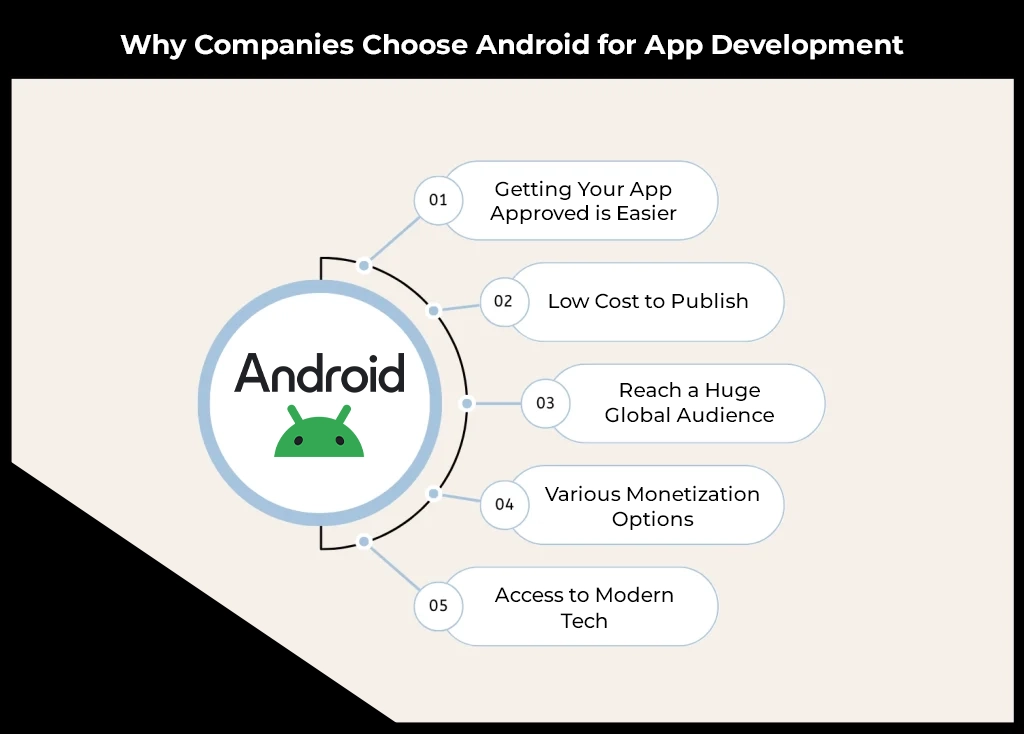
Why Companies Choose Android for App Development
There are a plethora of reasons as to why companies prefer Android’s operating system over iOS. Here’s why Android is such a favorite:
1. Getting Your App Approved is Easier
Submitting an app to Android is very straightforward. The Google Play Store mainly checks for basic guidelines and security. This means your app can launch faster. For businesses, this is perfect when you want to launch quickly and start reaching users.
2. Low Cost to Publish
It’s cheap to publish on Google Play. With a one-time $25 fee, you can release as many Android apps as you like. This is great if you want to try out a few app ideas without spending a fortune.
3. Reach a Huge Global Audience
Android has over 70% of the global mobile market, especially in regions like Asia, Africa, and Latin America. This means businesses can reach more users, targeting them based on country, device type, and price range.
4. Various Monetization Options
Android has a plethora of ways in which businesses can earn from their applications. You can include in-app purchases, ads, subscriptions, or even premium features. Tools like Google AdMob make it simple to earn revenue while reaching users worldwide.
5. Access to Modern Tech
Android is always updating its technology. The open-source nature of Android means the developers can use the latest tools to make innovative Android apps. This encourages businesses to create more competitive apps.
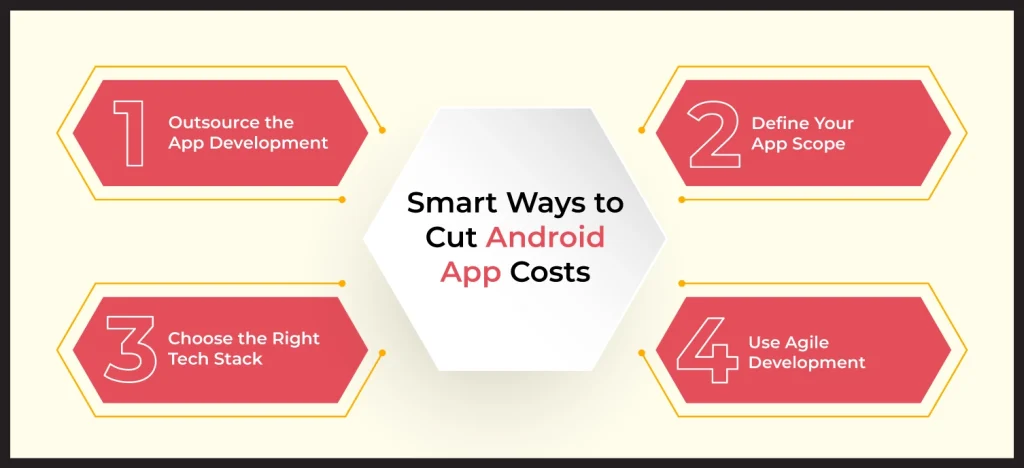
Smart Ways to Cut Android App Costs
Making an Android app can get expensive quickly if you don’t plan carefully. Fortunately, there are ways to cut corners while building a high-quality Android app that works perfectly across Android devices.
1. Outsource the App Development
Hiring local Android developers can be expensive. When you partner with a reliable Android app development company, it can help cut costs on salaries, office space, and perks. Experienced teams are skilled in Kotlin, Java, and cross-platform frameworks like Flutter or React Native. So, your Android app gets developed efficiently without breaking the bank.
2. Define Your App Scope
Before you start making your app, list all the features, target devices, budget, and timeline. When your requirements are clear, developers can avoid building unnecessary features or redoing work. A well-defined scope saves you time and ensures that your Android app is delivered on schedule and within budget.
3. Choose the Right Tech Stack
Having the proper technology stack can save you a lot of time. The right programming languages and frameworks mean developers can focus on your Android app’s core features and user experience rather than struggling with low-level coding. This speeds up the app development and also lessens the expenses.
4. Use Agile Development
Agile development is ideal for Android apps. Developers work in short cycles, testing and adjusting features along the way. This approach prevents expensive rework, keeps your Android app on track, and makes sure that your app is delivered timely within budget.
Wrapping Up
Making an Android app doesn’t have to break the bank if you plan ahead. You have to keep your goals clear, choose the right tools, and work with skilled developers. Sure, hidden costs such as device testing, updates, and maintenance can pop up, but don’t let them scare you. With a team like Linkitsoft, the cost of your Android app becomes clear from the start.
Once we understand your project and requirements, we will build a dedicated team, handle expenses, and provide a cost estimate, letting you focus on running your business. With the right approach, your Android app idea can become a reality and truly connect with your target users.
Frequently Asked Questions
How much does it cost to develop an Android app?
Well, it really depends on your custom Android app. For example, a simple Android app with basic features might cost around $10,000. But if your app has advanced features, custom designs, or complex functionality, the cost can easily go over $300,000. Knowing what you want from the start makes budgeting much easier.
Should I hire freelancers or an Android development company?
For small, simple apps, freelancers might work fine. But for serious Android apps, a full team from a professional Android app development company is usually the better choice. They handle everything, from coding, design, testing, and project management, so you can be stress-free and focus on the growth of your business.
How long does it take to create an Android app?
It depends on complexity. Simple apps can take 2–3 months, medium-level apps around 4–6 months, and complex apps like gaming, fintech, or healthcare apps may take 9–12 months or more. Experienced teams such as Linkitsoft’s help speed things up since they know the process inside out.
Are there hidden costs in developing an Android app?
Yes, and these often catch people by surprise. Costs such as device testing, security features, frequent OS updates, legal compliance, and post-launch maintenance can add up. Planning for these early keeps your budget realistic and prevents unexpected delays.