The global online grocery market is growing faster than ever. In 2024, it was valued at $67.64 billion. Experts at Grand View Research expect it to reach $992.35 billion by 2033. This means the online grocery market will continue to grow at a CAGR of 36.8% from 2025 to 2033.
This rapid growth is creating a big opportunity for businesses. Grocery apps can help meet the changing needs of today’s customers. At the same time, building a grocery app is not simple. The cost can vary depending on several important factors.
That is why understanding what affects the cost is so important. It helps businesses plan properly and use their resources wisely. In this blog, we will look at the main factors that influence grocery app development costs. We will also explore business models, development stages, and ways to manage costs effectively.
Business Models That Affect Grocery App Costs
The business model you choose has a big impact on your app’s development cost and the kind of technology you’ll need. Different models require different levels of complexity, features, and backend systems. Let’s look at the three most common approaches.
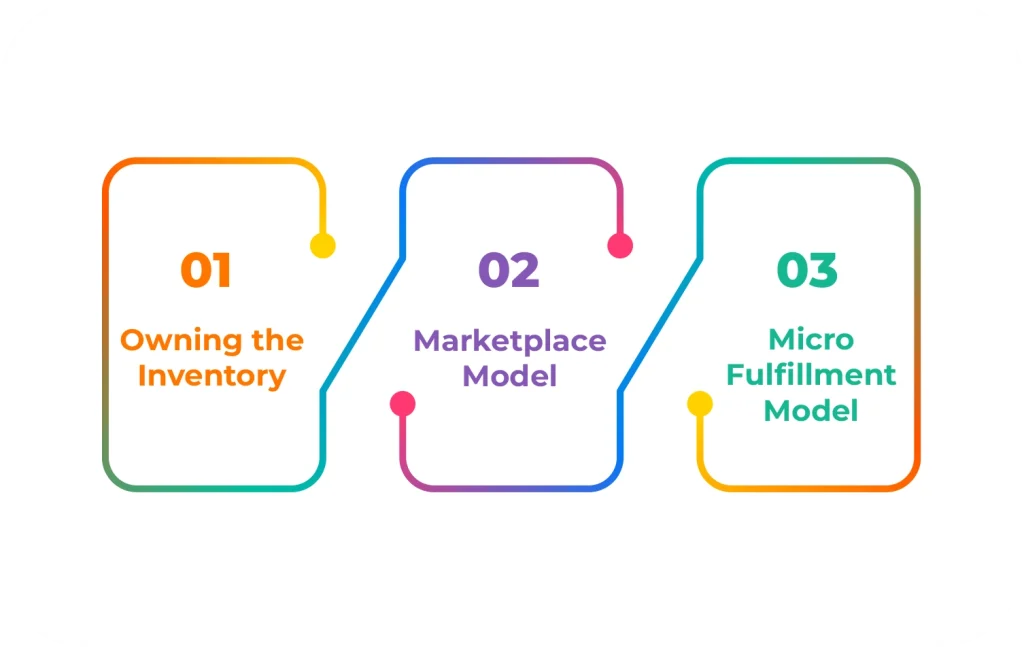
1. Owning the Inventory
In this model, you own all the products yourself, like Amazon Fresh. You either manage your own warehouse or work directly with suppliers. This means you handle inventory and delivery.
Pros: You have full control over product quality and stock availability.
Cons: Operational costs are higher since you take care of everything yourself.
Cost Impact: You’ll need advanced inventory management systems and warehouse integration. This adds to the overall development cost.
2. Marketplace Model
Marketplace applications connect customers with multiple grocery stores, similar to Instacart or other aggregators. You act as a grocery platform, bringing stores and buyers together.
Pros: It’s faster to launch and scale. Also, inventory risk is lower.
Cons: You depend on partner stores for speed and quality of delivery.
Cost Impact: You will need multi-vendor management systems and detailed dashboards for store partners. This can increase the overall costs of your grocery app.
3. Micro-Fulfillment Model
Micro-fulfillment combines small stores with external vendor partnerships. This means you can keep some stock yourself, but also rely on partners for a wider product range.
Pros: Offers a balance between control and variety.
Cons: Backend systems are more complex to handle both internal and external supply chains.
Cost Impact: You need features from both inventory-based and marketplace models, making this the most expensive upfront.
Choosing the right model is crucial. Pick the wrong one, and you may end up rebuilding your app later at a much higher cost.
Tip: If you have limited funds, start with a marketplace model. Once your grocery delivery app grows and your user base expands, you can gradually add inventory control features. This staged approach lowers initial costs and lets you validate your business idea before making a bigger investment.
What Influences the Cost of a Grocery Delivery App?
The cost of making a grocery app can vary a lot. Typically, it falls between $35,000 and more than $200,000. The exact overall cost depends on how complex the app is, which features it has, and the overall size of the project.
Other factors also play a big role in the cost. These include the technology used to create the app, the design, backend development, and any third-party integrations. The size of the development team, testing, ongoing maintenance, and the need for future upgrades also affect the budget.
Here’s a simple way to look at costs based on the type of app:
Starter App (Basic MVP): $35,000 to $50,000
Intermediate App: $50,000 to $100,000
Advanced or Enterprise App: $80,000 to $200,000+
As you can see, adding more features and complexity increases the cost. Many businesses start with a basic version and expand later to manage their budget more efficiently.
Key Factors That Influence Grocery App Development Cost
The cost of developing a grocery delivery app depends on more than just its overall complexity. In reality, several technical and business decisions shape the final budget. Each choice you make during planning directly affects how much you will invest.
For example, design style, backend structure, platform selection, and feature set all play a major role. So before setting a budget, it is important to understand how these elements increase or reduce costs.
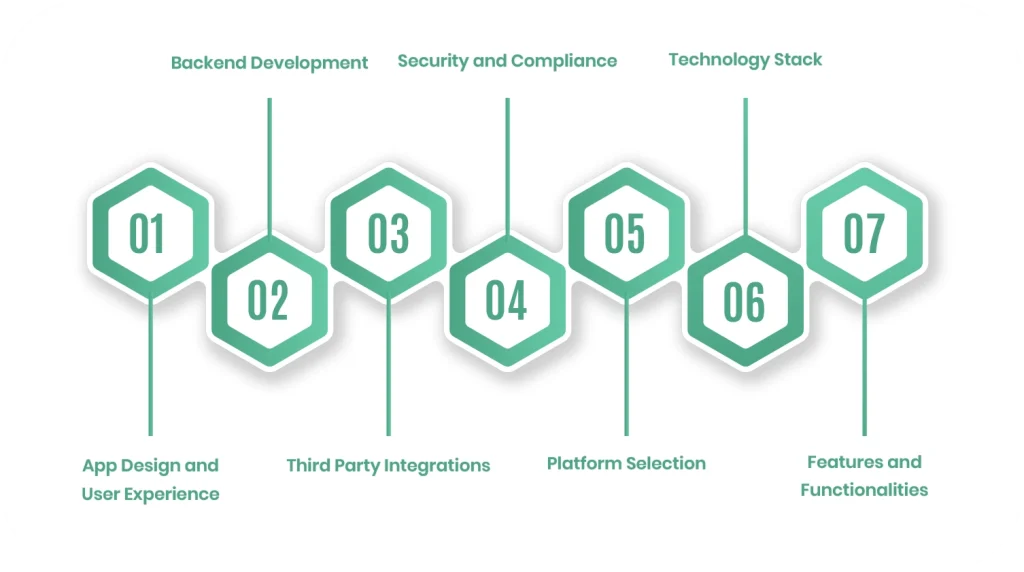
1. App Design and User Experience
First of all, design is not only about how your app looks. It also defines how easily customers can browse products, add grocery items to the cart, and complete their orders. If users feel confused, they will leave quickly.
A simple and clean interface costs less. On the other hand, a fully customized and interactive design requires more time and effort. In most projects, UI and UX design take around 15 to 20 percent of the total development cost. However, it strongly affects user satisfaction and application success.
| Design Level | What You Get | Estimated Cost |
| Basic Layout | Standard templates with minimal customization | $5,000 to $10,000 |
| Custom Design | Branded interface with custom elements | $15,000 to $30,000 |
| Premium Experience | Advanced animations, interactive elements, accessibility features | $30,000 to $60,000 |
2. Backend Development
While the grocery app design handles what users can see, the backend manages everything that occurs behind the scenes. It controls orders, user data, payments, and inventory updates. Therefore, a strong backend is crucial for intuitive app performance.
If your grocery app cannot handle traffic during peak hours, customers will experience delays or crashes. That is why backend architecture plays such a critical role in grocery app development cost.
| Backend Type | Capabilities | Estimated Cost |
| Basic Setup | Simple database and basic operations | $5,000 to $25,000 |
| Moderate System | User accounts, payments, basic reporting | $25,000 to $50,000 |
| Advanced System | Real-time inventory, routing, multi-vendor support | $50,000 to $80,000 |
| Enterprise Architecture | Scalable systems, custom integrations, microservices | $80,000 to $100,000 |
3. Third Party Integrations
Modern grocery apps cannot function alone. They depend on payment gateways, map services, SMS systems, and analytics tools. Because of this, integration costs must be included in your planning.
Basic integrations are usually affordable. However, connecting enterprise systems such as ERP or POS software increases both development time and cost.
| Integration Level | Examples | Estimated Cost |
| Basic | Stripe, PayPal, Google Maps | $5,000 to $10,000 |
| Advanced | POS systems, ERP software, analytics tools | $10,000 to $50,000 |
| Enterprise | Custom APIs, legacy systems, compliance systems | $50,000 to $100,000 |
4. Security and Compliance
Security is not optional. Grocery delivery apps handle payment details, personal addresses, and shopping history. If your grocery app is not secure, users will not trust it.
Moreover, compliance with standards such as PCI DSS adds additional development effort. Although security increases costs, it protects your brand and prevents serious losses in the future.
| Security Level | Protection Features | Estimated Cost |
| Basic | SSL certificates and basic encryption | $10,000 to $50,000 |
| Standard | Secure APIs, encrypted databases, and OAuth login | $50,000 to $100,000 |
| Advanced | Multi-factor authentication, threat monitoring, compliance frameworks | $100,000 to $150,000 |
5. Platform Selection
Another major decision is choosing the platform. You can build for iOS, Android, or both. If you target only one platform, the initial cost will be lower. However, you may miss a portion of potential users.
On the other hand, cross-platform development allows you to use a single codebase for both platforms. As a result, development becomes faster and more cost-efficient.
| Platform Strategy | Advantage | Estimated Cost |
| iOS Only | Optimized performance for Apple users | $5,000 to $150,000 |
| Android Only | Wider global market reach | $25,000 to $150,000 |
| Cross Platform | Single codebase, faster launch | $30,000 to $200,000 |
6. Technology Stack
The technology stack defines how powerful and scalable your app will be. A simple tech setup supports basic ordering and user management. However, advanced systems enable real-time tracking, AI-based suggestions, and detailed analytics.
Naturally, the more advanced the tech, the higher the development cost. Still, investing in the right tech stack can give you a competitive advantage in the long run.
| Tech Level | Capabilities | Estimated Cost |
| Basic Stack | Simple database and APIs | $5,000 to $15,000 |
| Moderate Stack | Real time updates and push notifications | $20,000 to $35,000 |
| Advanced Stack | Cloud systems, AI features, analytics | $40,000 to $70,000 |
| Enterprise Stack | Multi-cloud setup, advanced AI, high scalability | $80,000 to $120,000 |
7. Features and Functionalities
Finally, features directly impact your grocery app development cost. The more features you add, the more time and resources are required. Therefore, many businesses begin with essential features and expand later.
A smart approach is to launch with a minimum viable product and then upgrade gradually based on user feedback.
| Feature Level | Includes | Estimated Cost |
| Basic Features | Product listing, cart, checkout, and login system | $5,000 to $12,000 |
| Intermediate Features | Real-time tracking, reviews, push notifications | $10,000 to $20,000 |
| Advanced Features | AI recommendations, loyalty programs, and voice search | $20,000 to $50,000 |
| Enterprise Features | Multi-region support, subscriptions, advanced analytics | $50,000 to $100,000 or more |
As you can see, the grocery app development cost depends on multiple interconnected decisions. Therefore, careful planning is the key to balancing budget and performance.
Grocery App Development Cost by Project Stage
Grocery app development cost is not spent all at once. Instead, it is divided across different stages of the development process. Each stage has its own purpose, timeline, and budget requirement.
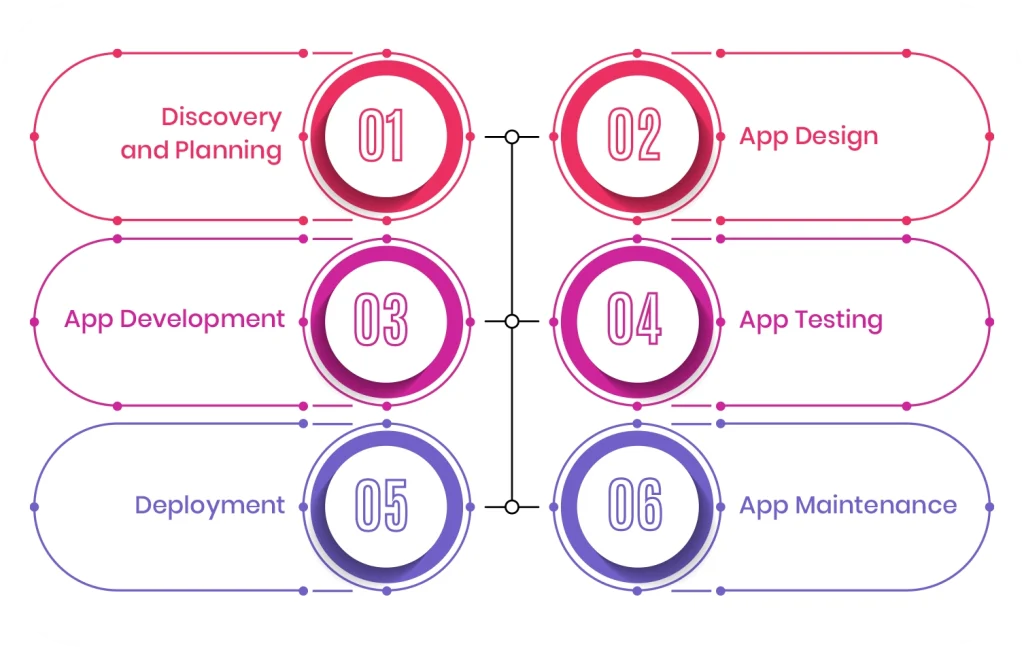
1. Discovery and Planning
The discovery phase is where everything begins. At this stage, the team defines the app’s goals, target audience, and business model. Without proper planning, the project can easily go off track.
This phase usually costs between $5,000 and $15,000 or more, depending on complexity. This includes market research, competitor analysis, feature planning, technical requirement gathering, and timeline estimation. The technology stack for your grocery app is also selected during this stage.
2. App Design
Once planning is complete, the focus shifts to design. This stage is about creating an easy and enjoyable experience for users. Designers prepare wireframes, visual layouts, and interactive prototypes.
The cost generally ranges from $10,000 to $60,000 or more. The final amount depends on how detailed and customized the design is. At this stage, branding elements such as colors, fonts, and logos are also finalized. The goal is to make browsing, adding to cart, and checkout feel simple and smooth.
3. App Development
This is the most resource-intensive stage. Here, developers turn designs into a fully working application. Both frontend and backend systems are built during this phase.
The cost can range from $15,000-$100,000 or more. It depends on app complexity and the number of platforms, such as Android, iOS, or web. For a grocery delivery app, this stage includes customer panels, delivery partner panels, and admin dashboards. Important grocery app features such as product listings, payment systems, notifications, GPS tracking, and order management are integrated at this stage.
4. App Testing
After development, testing becomes essential. This stage ensures the app works properly under real-world conditions. Without proper testing, users may face crashes or payment issues.
Testing usually costs between $5,000-$25,000 or more. It involves functional testing, performance testing, usability checks, and security validation. In addition to this, load testing is performed to confirm that the app can handle many users at the same time.
5. Deployment
Once testing is complete, the grocery application is prepared for launch. This stage includes setting up servers, configuring cloud systems, and also submitting the application to the Apple App Store and Google Play Store.
The total cost also depends on licensing fees, server configuration, and DevOps setup. Many businesses also prefer to release a beta version first. This helps collect feedback before the full public launch.
6. App Maintenance
Even after launching the app, the investment does not stop. Regular maintenance is necessary to keep the app running smoothly. This includes fixing bugs, monitoring servers, and adding new features based on user feedback.
Maintenance usually costs around 15-25 percent of the total development cost each year. The exact amount depends on app size, traffic volume, and update frequency. Continuous updates help improve ratings and retain users.
Smart Ways to Reduce Grocery App Development Cost
Building a grocery delivery app requires proper investment. However, that does not mean you need to spend more than necessary. With the right app planning and strategy, you can control your budget while still developing a high-quality grocery app.
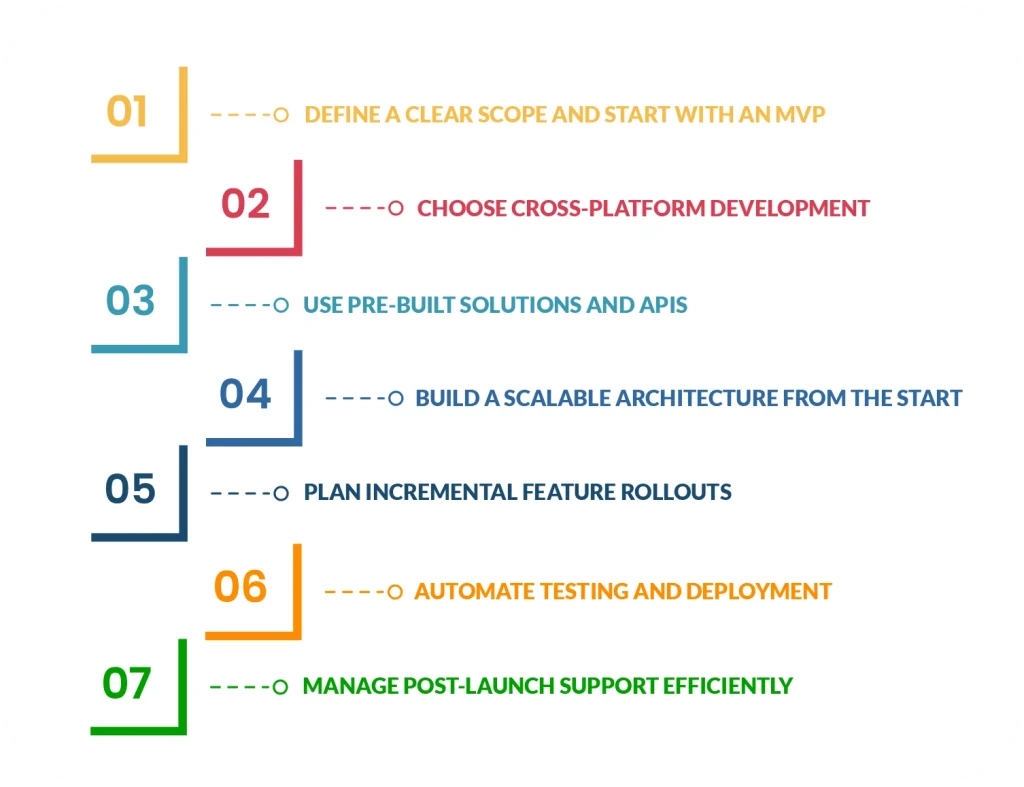
1. Define a Clear Scope and Start with an MVP
One of the most effective ways to reduce development cost is to begin with a Minimum Viable Product. Instead of launching a fully featured app, focus only on the core functions such as product listings, cart management, and payment processing.
This approach can reduce your initial investment by 20 to 35 percent. More importantly, it prevents you from wasting money on features that users may not even need. Once the app gains traction, you can gradually expand it.
2. Choose Cross-Platform Development
Making separate apps for Android and iOS increases both time and budget. Therefore, many grocery businesses prefer cross-platform development frameworks.
With a single codebase, you can launch on both platforms faster. As a result, development time is reduced, and maintenance becomes easier. This approach can significantly lower overall costs without affecting performance for most grocery apps.
3. Use Pre-Built Solutions and APIs
It is not necessary to build every feature from scratch. Many essential services, such as payment gateways, login systems, and push notifications, already offer ready-made APIs.
By using these existing solutions, you can reduce backend work and integration time by 20 to 30 percent. At the same time, you benefit from proven reliability and security.
4. Build a Scalable Architecture from the Start
At first, investing in scalable architecture may seem expensive. However, it saves money in the long run. If your app grows quickly and your system cannot handle the traffic, rebuilding everything later will cost far more.
Therefore, it is better to prepare for growth early. A scalable backend ensures your app performs well even as user numbers increase.
5. Plan Incremental Feature Rollouts
Instead of launching all features at once, release them step by step. This allows you to spread development costs over time and reduce financial pressure.
In addition, you can study user feedback before investing in advanced features. In many cases, early revenue from users can support future updates.
6. Automate Testing and Deployment
Manual testing takes time and increases operational costs. By investing in automated testing tools and continuous integration systems, you can speed up the quality assurance process.
As a result, development cycles become shorter and more efficient. This not only reduces costs but also improves app stability before launch.
7. Manage Post-Launch Support Efficiently
Post-launch maintenance can become expensive if it is not handled properly. Instead of making random updates, plan regular maintenance cycles.
Monitor app performance consistently and fix small issues before they turn into major problems. This approach keeps long-term costs under control and protects your brand reputation.
Bottom Line
In the end, the grocery app development cost is only one part of the bigger picture. What truly matters is how well your grocery app solves real customer problems. Businesses that understand user behavior, offer real convenience, and improve operational efficiency are the ones that stand out in this competitive market.
If you want to build your grocery app the right way, connect with Linkitsoft to make it happen. When done right, it does more than generate orders. It builds loyalty, increases repeat purchases, and creates steady growth. So rather than asking only how much it costs, the better question is how much value it can create for your business in the years ahead.
Frequently Asked Questions
What is the average cost to build a grocery app?
The cost of building a grocery app depends on its size and features. A basic app for a single grocery store with product listings and online payments may start around $35,000. However, if you plan to build a large-scale grocery marketplace with advanced features and integrations, the cost can go beyond $200,000. In short, the grocery app development cost increases as the app becomes more complex and scalable.
How much time does it take to develop a grocery app?
A simple grocery app can usually be completed in about 4 to 6 months. If the app includes multiple user panels, advanced search filters, real-time inventory updates, or custom systems, it may take 8 to 12 months or longer. The total timeline depends on planning, design, development, testing, and final launch.
What can I do to reduce grocery app development costs?
To manage your budget wisely, begin with an MVP that includes only the essential grocery app features, such as product catalog, cart, and checkout. After launch, you can add more advanced features based on user demand. Choosing cross-platform development and using reliable third-party tools also helps control app expenses.
Is adding AI to a grocery application worth the additional cost?
AI can improve the grocery shopping experience by offering personalized product suggestions and smarter search results. Although it increases initial development costs, it can improve customer engagement and boost repeat purchases over time. Therefore, it can be a valuable addition if your goal is long-term growth.