Custom billing software plays a direct role in how efficiently a business manages its revenue, cash flow, and compliance. As companies grow, billing operations become more complex. Coupled with multiple pricing models, geographies, tax rules, and integrations with accounting or ERP systems, it’s a hassle for the organization. At this stage, generic off-the-shelf billing tools often struggle to keep up.
Custom billing software works the way your business already does. It handles invoicing automatically, follows your specific pricing and billing rules, and cuts down on mistakes. Payments get processed faster, and your team can see all transactions in one place. This makes it much easier to track revenue and stay on top of compliance as your business grows.
In this comprehensive guide, we’ll cover everything you need to know about billing software development in 2026. From costs and core features to development process and challenges, you’ll get a clear picture of what it takes to build a secure and enterprise-ready billing system. Let’s dive in!
A Market Overview of Billing Software
The need for billing software is rising quickly. As companies move their financial operations online, they want tools that are accurate and easy to scale. Analysts estimate the global billing and invoicing software market could grow from about USD 5.4 billion in 2025 to around USD 14 billion by 2033. That’s a clear sign of how important modern billing solutions have become!
Several trends are driving this growth. More businesses are switching to cloud-based software for flexibility and easy access to their data. They also want billing systems that connect smoothly with other tools, like ERP and CRM platforms. Subscription-based billing is becoming more common, especially for SaaS companies and service businesses. At the same time, smart automation is helping reduce repetitive work and giving teams better insights into revenue and cash flow.
Overall, the market is moving toward billing software that does more than just generate invoices. Companies are looking for solutions that fit their workflows, give clear visibility into finances, and grow along with their business.
Types of Billing Software You Can Build
Different businesses have different needs, and the right solution depends on how you handle payments, invoices, and recurring charges. Here are the main types of billing software and what they are best for:
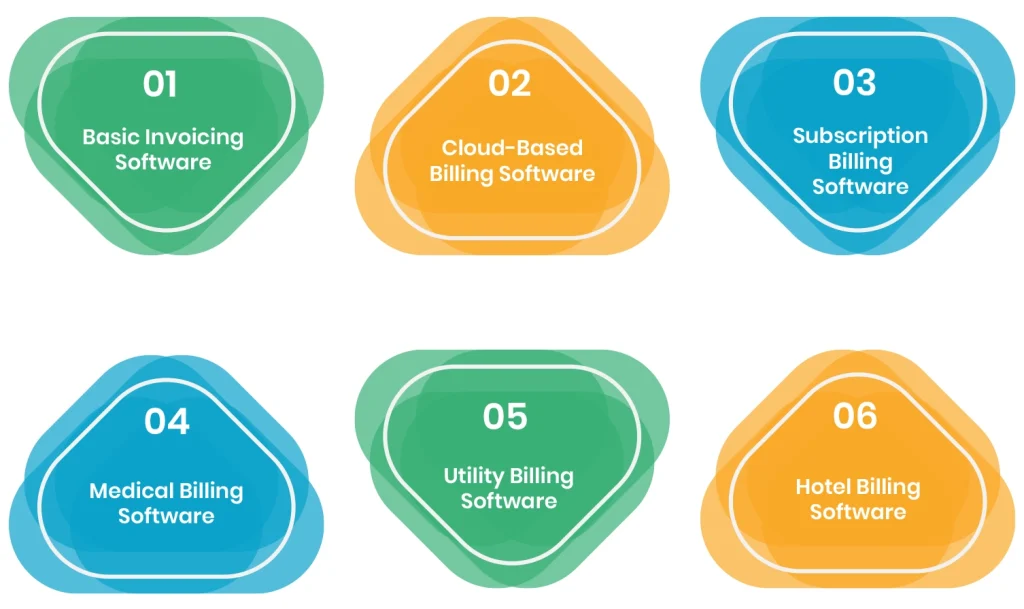
Basic Invoicing Software
This type of software is ideal for freelancers, small businesses, or startups that need a simple way to send invoices and track payments. It focuses on the essentials, creating invoices, recording payments, and generating basic reports. There are no complicated features, which makes it easy to use and set up quickly.
Cloud-Based Billing Software
Cloud billing tools let you access your system from anywhere. They usually support multiple users, automatic backups, and integrations with other cloud-based tools. This makes them a good choice for companies with remote teams or offices in various locations.
Subscription Billing Software
For businesses that rely on recurring revenue on a monthly or yearly basis, such as SaaS, membership services, or subscription boxes, subscription billing software is a necessity. It handles recurring invoices, multiple pricing plans, and automated billing cycles, helping businesses manage subscriptions without errors.
Medical Billing Software
Healthcare providers use medical billing software to manage patient invoices, insurance claims, and complex coding requirements. This type of software ensures compliance with healthcare regulations and helps reduce administrative work. This makes billing faster and more accurate.
Utility Billing Software
Utility companies that supply water, electricity, or gas use specialized utility billing software to calculate rates, track usage, and issue bills. Moreover, it can handle different tariff structures and billing cycles, while also helping track payments and manage customer accounts.
Hotel Billing Software
Hotels and resorts often need software that integrates reservations, check-ins, and billing. Hotel billing software can handle room charges, amenities, incidentals, and guest invoices all in one system. It streamlines operations and ensures smooth billing for both staff and guests.
Understanding the type of billing software your business needs is the first step to building a system that works for you. Once you know this, you can plan features, the development process, and the cost for a custom solution.
Costs of Developing a Billing Software System
Building billing software usually costs more than people expect. This is not because developers underestimate features. Billing itself is more complicated than it looks. Rules change, discounts appear, and compliance requirements keep evolving. A system that works today may struggle tomorrow.
The cost depends on three main things: how complex your billing rules are, how many other systems the software needs to connect with, and how much it needs to adapt as your business grows.
Small Billing System
Small billing systems are perfect for startups or small teams. They handle basic invoicing and payment tracking. These systems work well when billing rules are simple and do not need to connect to many other tools. Many small businesses start here and continue using them for years. The typical cost range for this kind of system is between $45,000 and $80,000.
Mid-Scale Billing System
Mid-scale systems are for growing businesses that need more than basic invoicing. They often include recurring billing, cloud access, approval workflows, and connections to accounting software. The system must handle variations without requiring constant manual fixes. This type of development usually costs between $80,000 and $180,000.
Enterprise Billing System
Enterprise billing software is built for high-volume and complex operations. It can handle multiple regions, audits, detailed pricing models, and large numbers of users. Most of the cost comes from building a strong, reliable system that can handle pressure, not just from adding extra features. Enterprise-level systems typically cost between $180,000 and $350,000 or more.
Budget Breakdown for Billing Software Development
Here is how the billing software development budget is usually divided:
- Planning and Mapping Rules (10–15%): Understanding the real billing rules in your business, handling exceptions, and accounting for compliance. Skipping this stage often leads to costly fixes later.
- Designing Workflows and Interfaces (10–15%): Creating the screens and steps staff will use every day. Poor design can cause mistakes and extra manual work.
- Development and Integrations (45–55%): Writing the billing logic and connecting it to payment systems, ERP, and CRM tools. This is the largest part of the budget.
- Testing Before Launch (10–15%): Checking that everything works correctly. Mistakes here can directly affect revenue and customer trust.
- Maintenance and Updates (10–20% per year): Adjusting for pricing changes, new rules, and system improvements over time.
Time to Develop Your Billing Software
How long it takes to build billing software depends on the system’s size and complexity. Small systems with basic invoicing and simple payment tracking usually take about 2 to 3 months. This timeframe allows enough time to set up the core features and test that everything works correctly.
Mid-scale systems, which include recurring billing, cloud access, and integrations with accounting tools, generally take 4 to 6 months. Moreover, these systems need extra time to connect with other tools and handle variations in billing rules.
Enterprise systems are the most complex. They handle high volumes, multiple regions, detailed pricing models, and audits. For this reason, building an enterprise billing system can take 7 to 12 months or more, depending on the number of integrations and how thoroughly it needs to be tested.
However, most delays come from the system’s complexity rather than slow development. Starting with clear requirements and careful planning at each stage can save time and prevent costly rework. On the contrary, skipping the planning or testing phase can stretch timelines significantly, even for smaller systems.
Next, we will talk about the factors that affect billing software development costs in detail.
What Factors Affect Billing Software Development Costs?
The cost of building billing software depends on several important factors. Understanding these can help you plan a solution that works for your business and fits your budget. Each factor influences not only the price but also the time and effort required for development.
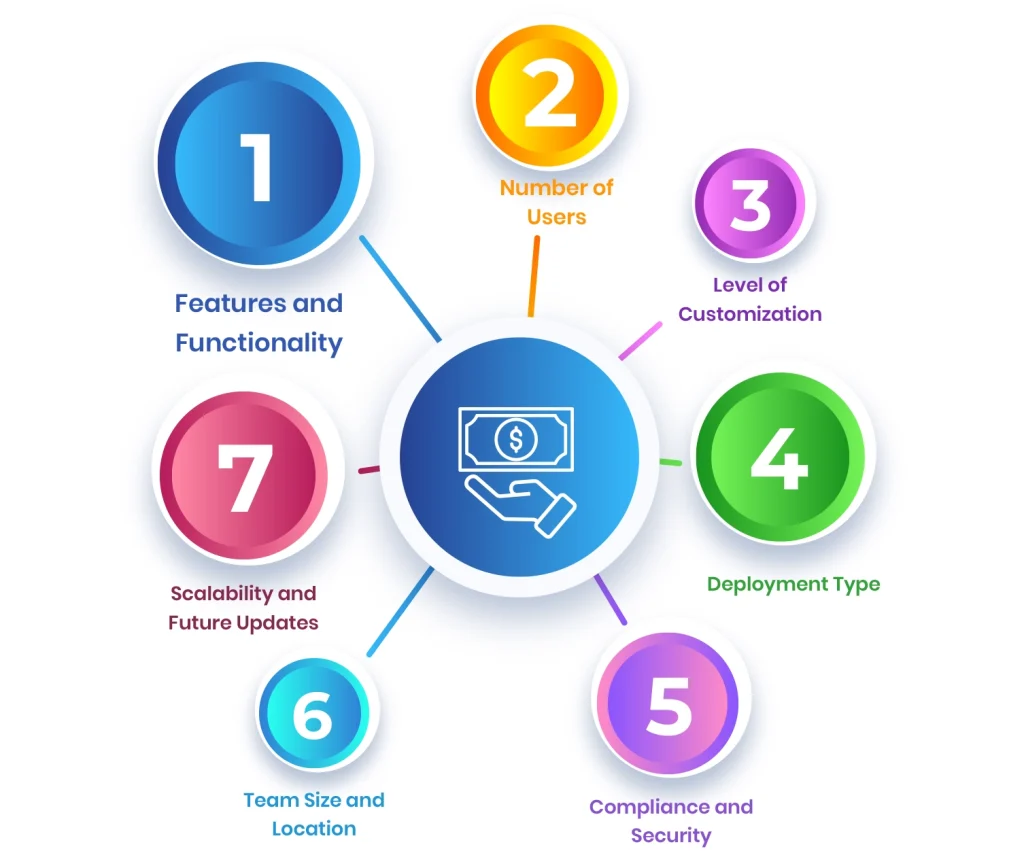
1. Features and Functionality
The complexity of the features has a big impact on the billing software development cost. A simple billing system that only handles invoicing and payments is easier and faster to build. But when you add advanced functions like automated billing cycles, multi-currency support, subscription management, or detailed reporting, the development becomes more involved.
For example, a company operating in multiple countries will need the software to calculate taxes and handle different currencies automatically. Adding custom reports for finance teams or management dashboards also requires extra work. As a result, the more complex the features, the higher the cost and the longer the development time.
2. Number of Users
The number of people who need access to the system also affects pricing. Small teams with only a few users will have lower costs, while larger organizations with many employees or clients accessing the system need more licenses and infrastructure.
Pricing is often based on either the number of users or the number of transactions the system processes. Planning for growth is important because, as the business expands, the software must handle more users without major redesigns.
3. Level of Customization
Customizing the billing software to match your specific business processes increases costs. But, at the same time, it makes your revenue more streamlined. This can include connecting the billing system with accounting or CRM platforms, making specialized reports, or implementing unique billing rules.
For example, a subscription service might need billing that calculates charges based on its usage. Whereas a medical practice may need patient-specific invoicing integrated with insurance claims. The more personalized the software, the more work is required, which raises the overall development cost.
4. Deployment Type
Whether the software is hosted on the cloud or installed on company servers changes the cost. Cloud-based solutions usually cost less to start and provide automatic updates, backups, and remote access.
Software installed on your own servers requires a bigger initial investment because of hardware, installation, and IT support. It also demands ongoing maintenance and upgrades. Choosing the right deployment method depends on your budget, security needs, and operational setup.
5. Compliance and Security
It’s no surprise that billing software deals with sensitive financial data, so following legal and industry standards is essential. Rules such as GDPR, HIPAA, or PCI-DSS require strong security measures and documentation.
This could include encrypting transactions, controlling who can access the system, and keeping detailed logs. So, meeting these necessary requirements adds extra development work and ongoing management, which increases overall billing software costs.
6. Team Size and Location
The team you hire to build the customised billing software affects both price and quality. Agencies in high-cost regions may charge more, while skilled developers in countries like India can provide reliable work at lower prices.
However, lower-cost teams may need closer supervision or longer coordination. It is important to balance cost with experience, communication, and proven results when selecting a development partner.
7. Scalability and Future Updates
A system that can grow with your business is more expensive at the start, but it saves money over time. Scalable software can handle more users, transactions, and new features without needing a complete rebuild.
Every time you add new features or adapt the system to new business needs, costs increase. Planning for future growth ensures your billing software stays effective, reducing the need for costly replacements later.
Key Features That Make Billing Software Work for Your Business
Billing software works best when it combines clarity, automation, and control. Below are the main features that make custom billing software effective and why they matter for your business.
Invoices Designed for Your Brand
Invoices are the documents sent to clients requesting payment. They can include company logos, colors, and layouts to match your brand identity. Moreover, clear and professional invoices reduce misunderstandings and make it easier for clients to process payments.
Recurring Billing Cycles
Recurring billing manages regular payments for subscriptions or ongoing services. Once the schedule is set, invoices are sent automatically. For this reason, teams spend less time on repetitive tasks, and cash flow becomes more predictable.
Multi-Currency Transactions
Multi-currency support handles payments in different currencies. It tracks exchange rates in real-time and converts amounts accurately. This makes sure that international payments are correct and simplifies reporting across countries.
Sales Reports
Reports provide a summary of revenue, sales trends, and profitability. They give insights into the firm’s financial health and help teams make more informed decisions. Moreover, trends over time can guide further planning and resource allocation.
Accounting Software Integration
Integration links the billing system with accounting tools such as QuickBooks, Xero, or Sage. This keeps records synchronized automatically and reduces manual data entry. For this reason, audits are simpler and financial information remains accurate.
Customer History and Insights
Customer records store all past transactions and interactions. Teams can quickly see payment histories, resolve questions, and maintain strong client relationships. Additionally, having this information in one place enhances customer service efficiency.
Budget Tracking and Allocation
Budgets can be assigned to departments or projects, and alerts notify teams when spending exceeds limits. This makes sure that the firm’s resources are used efficiently and helps keep financial planning on track. Moreover, it supports better decision-making for future investments.
Flexible Payment Options
Clients can pay using bank transfers, credit cards, or digital wallets. So, payments are processed securely, offering convenience while keeping sensitive information safe. Furthermore, offering multiple options can reduce payment delays.
Automated Invoice Sending
Invoices are generated and delivered according to a predefined schedule. This reduces missed payments and frees teams from repetitive administrative work. For this reason, businesses can maintain a steady cash flow without any constant manual follow-ups.
User Roles and Permissions
Access levels define who can view or edit data. This feature is useful as sensitive information stays protected, and responsibilities are clear across the team. Moreover, proper controls lessen the likelihood of errors and maintain accountability.
Audit Trails
Every transaction and system change is logged with the user and timestamp. This feature maintains transparency, supports compliance, and makes it easier to track updates. Additionally, it helps businesses maintain trust with clients and regulators.
Next, we will explore the full process of developing custom billing software, covering planning, design, development, testing, and launch, so you can see what it takes to build a reliable billing system.
How Custom Billing Software Is Built?
Creating a billing system involves several stages to make sure it works reliably and fits your business needs. Each step makes sure that the custom billing software performs well, integrates with other tools successfully, and supports your operations efficiently.
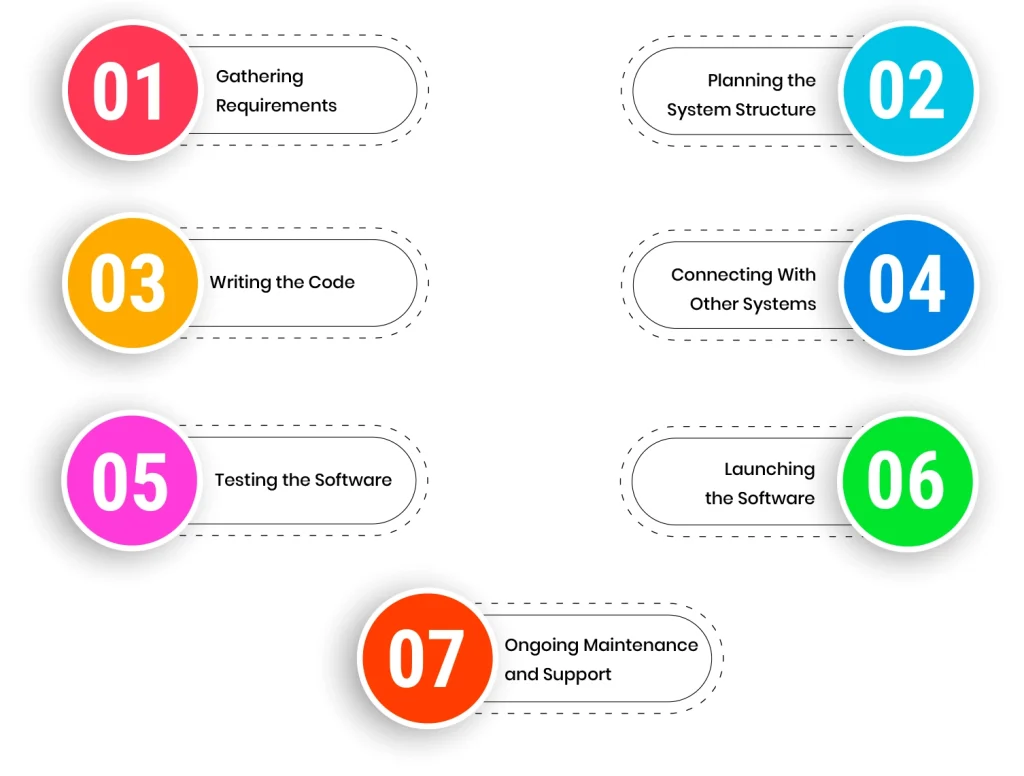
1. Gathering Requirements
The process starts by collecting detailed requirements from stakeholders. This includes understanding what features are needed, such as invoicing, payment processing, and reporting. Moreover, clarifying user roles and compliance requirements at this stage helps guide the entire development process.
2. Planning the System Structure
Designing the software’s architecture establishes how it will operate now and in the future. Wireframes and layouts are created to show how users will interact with the system. For this reason, careful planning ensures the software can scale and connect with other business tools without issues.
3. Writing the Code
Development begins by coding the features defined during planning. This includes payment gateways, invoice creation, reporting tools, and other core functions. Following best practices ensures the software is secure, maintainable, and capable of handling growth. Moreover, the complexity of features and customizations heavily influences development cost.
4. Connecting With Other Systems
The billing software is linked to accounting, CRM, or ERP platforms. Integration can use existing tools or custom APIs. Proper connections keep data consistent across systems and improve the accuracy of financial reporting and operations.
5. Testing the Software
The system is thoroughly tested to confirm it works as expected. This includes user acceptance testing, integration testing, and performance checks. Additionally, testing security and usability ensures a stable product and reduces problems after launch.
6. Launching the Software
Deployment prepares the software for live use. This includes configuring the environment, moving data, and running final tests. A smooth deployment minimizes disruptions and makes sure the system works correctly from day one.
7. Ongoing Maintenance and Support
After launch, the software is monitored and maintained to fix bugs, update features, and apply security patches. Support helps users with any operational issues. For this reason, ongoing maintenance is critical for reliability and adapting the software as business needs change.
Challenges in Developing Custom Billing Software
Building custom billing software can be complex, and certain challenges are common.
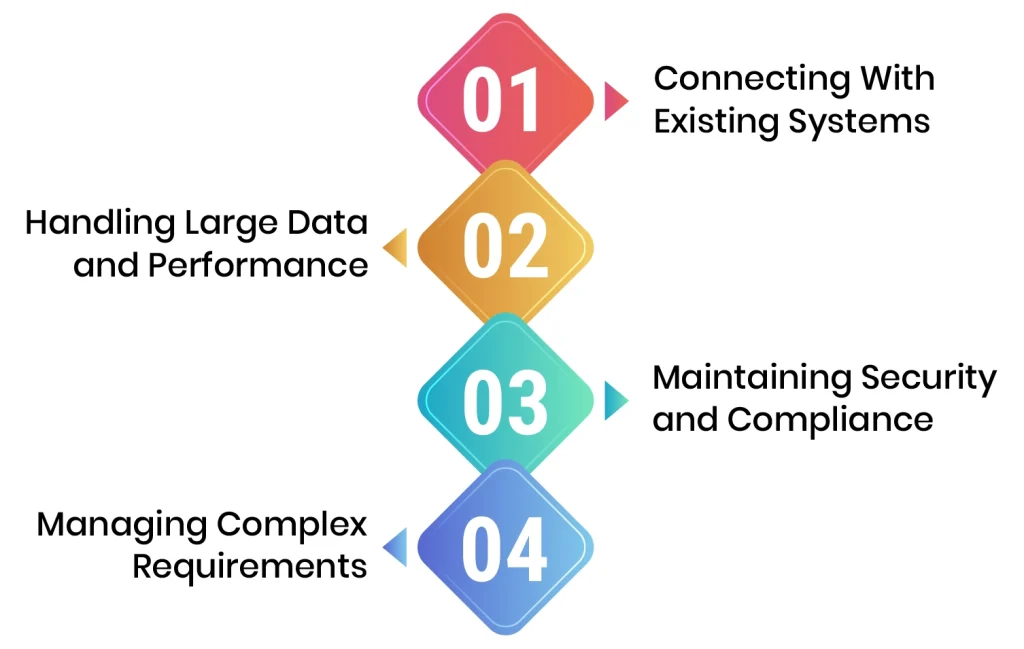
Connecting With Existing Systems
Linking billing software to ERP, accounting, or CRM platforms can create data mismatches or workflow issues. For this reason, careful planning and testing of integration points are essential. Using standard APIs or middleware can help maintain consistent data across systems.
Handling Large Data and Performance
Billing software must process many transactions and work under varying loads. And, performance problems can slow operations and frustrate users. Moreover, optimizing code, database queries, and server settings ensures the system remains fast and reliable.
Maintaining Security and Compliance
Financial data is sensitive, and software must follow rules such as GDPR or PCI-DSS. This can be complex, but it is critical to avoid legal or financial problems. This can be solved by implementing encryption, access controls, and regular audits to protect data and keep the system compliant.
Managing Complex Requirements
Custom billing systems need to fit unique business rules and workflows. Capturing these requirements accurately can be difficult. However, engaging stakeholders, using prototypes, and refining features iteratively ensures the software meets business needs.
Wrapping Up
That brings us to the end of our guide. To sum up, building custom billing software is complex, but working with an experienced development team can help you navigate challenges, integrate your billing software with existing systems, and make sure that the custom billing software meets your business needs. With the right development approach, your billing solution can streamline operations, improve accuracy, and support long-term growth.
Frequently Asked Questions
What is the billing software process?
The billing software process is just like creating any other software, but with more security and compliance requirements. It includes defining business requirements, designing workflows, coding features, testing the system, integrating it with other tools, and deploying it for live use. Ongoing maintenance and updates ensure accuracy, security, and adaptability to changing business needs.
What language is used in billing software?
Billing software can be made using a variety of programming languages, depending on the platform. Common choices include Java, C#, Python, and JavaScript for web applications, while mobile billing apps often use Swift for iOS and Kotlin or Java for Android.
What software is used for billing?
Custom billing software can be built to match the specific needs of a business. It can range from simple tools for invoicing to comprehensive systems for large enterprises. Examples include cloud-based billing platforms, subscription management systems, and industry-specific solutions such as medical or utility billing. These systems are often connected to accounting or ERP software to keep all financial information consistent and organized.