
Building a mobile app requires clear planning, realistic timelines, and structured execution. Without a defined development timeline, projects often face delays, rising costs, and unclear expectations.
Many businesses begin app development without fully understanding how long each stage takes. This results in rushed decisions, frequent revisions, and missed launch targets.
Understanding the standard mobile app development timeline helps teams plan resources, manage budgets, and track progress at every stage. It also creates alignment between stakeholders, designers, and developers.
This guide explains the complete mobile app development timeline from initial planning to post launch support. By the end, you will understand what happens at each stage, how long it usually takes, and why each step matters.
How Long Does It Take To Build A Mobile App?
Building a mobile app follows a structured process. Each stage serves a specific purpose and requires a defined amount of time. Knowing this upfront helps businesses plan teams, budgets, and delivery timelines more accurately.
Timelines can change based on app complexity, platform, and features. However, most mobile app projects follow six main stages.
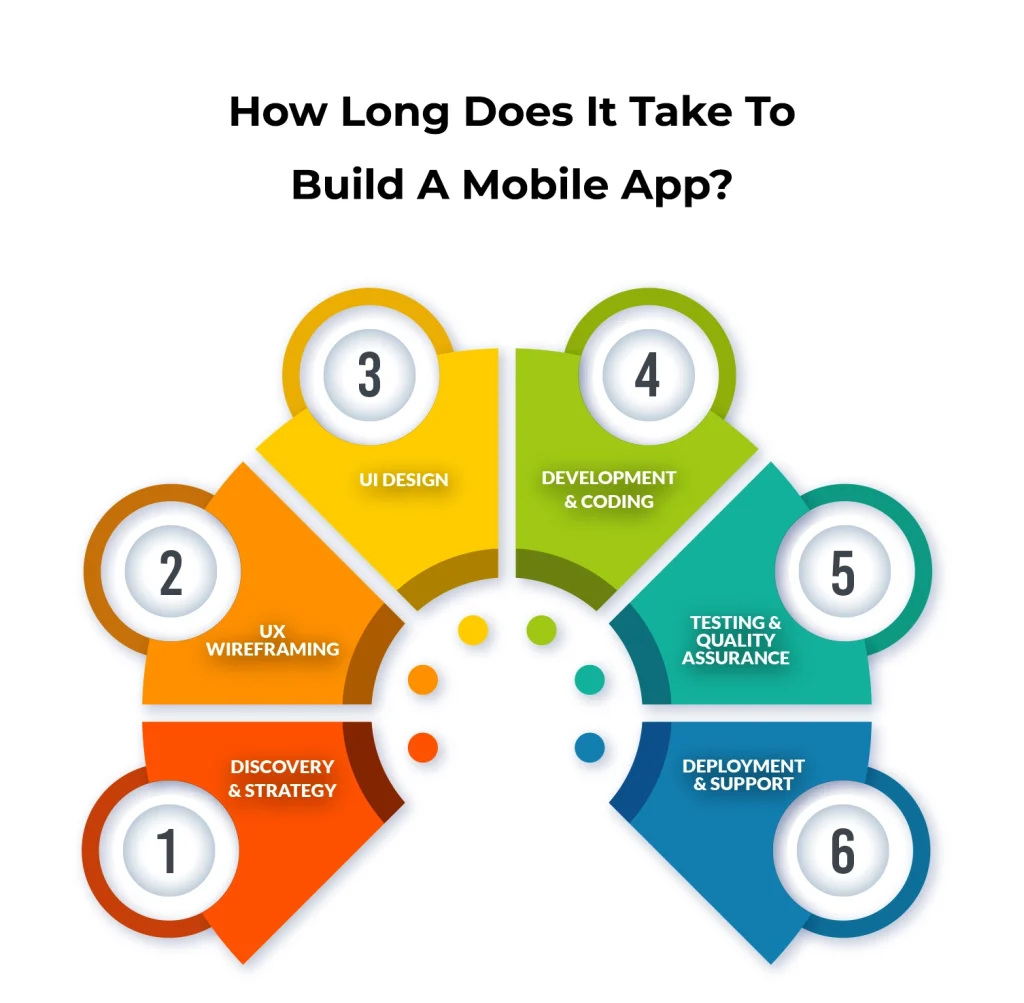
1. Discovery and Strategy
This stage defines the purpose of the app and sets clear goals before development begins. This is where your mobile app idea meets reality before any code is written. The goal is to understand users, analyze competitors, and define the core problem the app will solve.
Some key activities of this stage include:
- Defining core features to focus on essential functionality
- Validating the market to confirm user demand
- Planning monetization to align with business goals
At this stage, you also create a feature list, define goals, and outline the workflow. Common challenges at the discovery stage are about trying to include too many features or skipping competitor research. Doing this thoroughly avoids building a mobile app no one needs.
Time it usually takes: 2–4 weeks
2. UX Wireframing
Once the concept is clear, it’s time to plan the user journey. Wireframes show how users move through the app from one screen to another.
Wireframing lets you see if the mobile app is intuitive and easy to navigate. You can test ideas quickly before writing any code.Wireframing helps teams identify missing steps, confusing flows, and navigation issues early. Fixing these problems now prevents costly changes during development.
In this stage, you should make sure not miss steps in the user flow or make navigation confusing. So, wireframes allow you to fix these issues early.
Time it usually takes: 1–2 weeks
3. UI Design
This stage focuses on the visual design and overall user experience of the app. UI design covers colors, fonts, buttons, icons, and branding consistency. The goal is to create visually appealing and user-intuitive screens for your mobile app.
This stage usually involves creating high-fidelity mockups and interactive prototypes. This lets you click through the mobile app flow before development starts. Prototypes highlight usability issues early, which reduces expensive changes later.
Designs must follow platform guidelines for both iOS and Android. This ensures the app feels familiar and easy to use for each audience. Expect multiple rounds of tweaks to get every screen, interaction, and visual element right.
Time it usually takes: 3–6 weeks
4. Development and Coding
This is the most time intensive stage of the entire project. Development is usually divided into two parts:
- Frontend development handles everything users see and interact with.
- Backend development manages servers, databases, APIs, and data processing.
Most teams start with a Minimum Viable Product (MVP) first. The MVP contains only the core features needed to solve the main user problem. Building an MVP allows teams to launch faster and validate ideas with real users before expanding features.
Challenges here include syncing the frontend and backend, managing complex features like payments or notifications, and dealing with platform differences. Good planning from the earlier stages helps prevent these issues.
Time it usually takes: 8–14 weeks, depending on app complexity
5. Testing and Quality Assurance
Now, testing is crucial for mobile apps before they are launched. Testing ensures the app works correctly across devices, platforms, and operating systems. QA teams check for bugs, crashes, and usability problems across devices and operating systems.
Testing focuses on the following areas:
- Functional testing to check every button, link, and feature
- Performance testing to monitor speed, responsiveness, and battery usage
- Security testing to protect user data
- Usability testing to see how your users interact with the mobile app
Alpha testing is conducted internally by the mobile app development team. Moreover, Beta testing is done with a small group of external users to gather feedback. Fixing problems now prevents bad reviews and keeps users happy after launch.
Time it usually takes: 4–8 weeks, depending on complexity
6. Deployment and Support
After testing, the app is prepared for release on the Apple App Store and Google Play Store. This includes preparing marketing materials, meeting store guidelines, and waiting for the review process, which can take a few days to a week.
Launching the app is only the beginning. You still need to monitor the mobile app, fix new bugs, release updates, and add features based on user feedback. Mobile apps also need to stay compatible with new OS versions and device updates. Ongoing maintenance is what keeps a mobile app relevant and functional.
Time taken to prepare for launch: 1–2 weeks
Post-launch maintenance: ongoing and as per requirements
Strong planning at this stage reduces rework, prevents scope creep, and saves time later in development.
How App Complexity Affects Your Timeline
App complexity has a direct impact on development time at every stage. We’ve already talked about the standard stages of mobile app development and how long each usually takes. The real timelines can shift depending on the type of app you’re building.
| Development Stage | Simple App | Medium App | Complex App |
| Discovery & Strategy | 2–4 weeks | 4–6 weeks | 6–8 weeks |
| UX Wireframing | 1–2 weeks | 3–4 weeks | 6–8 weeks |
| UI Design | 2–4 weeks | 6 weeks | 8–12 weeks |
| Development & Coding | 4–8 weeks | 12–16 weeks | 20–28 weeks |
| Testing & QA | 2–4 weeks | 4–6 weeks | 8–12 weeks |
| Deployment & Support | 1–2 weeks | 2–3 weeks | 3–4 weeks |
This table helps teams estimate timelines, allocate resources, and set realistic delivery expectations before development begins.
Seeing the Timeline in Action with Real App Examples
Real world examples show how app complexity changes development timelines. Below are three common scenarios.
Simple App Example (A Unit Converter)
A simple unit converter is straightforward. It doesn’t need a server, user accounts, or complicated features. During the discovery and strategy stage, which usually takes 1 week, you decide which units the app will convert and who will use it. The UI and UX design phase takes about 2 weeks, focusing on clean wireframes and an easy-to-use interface.
Development then takes around 4 weeks, where the conversion logic is built and connected to the interface. Testing and QA take 1 week to make sure calculations are accurate, and the app works on different devices. Finally, deployment takes a few days to submit the app to app stores. In total, a simple app like this typically takes about 2 months. Because there’s no backend or integrations, it moves quickly.
Medium App Example (Social Media App)
A social media app is more complex. It needs user profiles, content feeds, messaging, and a server to store data. Discovery and strategy usually take 4 weeks, including competitor research, mapping user flows, and defining key features. UI and UX design takes about 6 weeks to create detailed wireframes and interactive prototypes.
Development is the longest stage, taking around 14 weeks, with frontend and backend teams building profiles, feeds, messages, and notifications. Testing and QA take 4 weeks to ensure logins, data syncing, and app stability. Deployment usually takes 2 weeks for server setup and app store submission. Overall, a medium-complexity app takes roughly 6 to 7 months. The extra features and backend work naturally extend the timeline.
Complex App Example (Fintech App)
Fintech apps are the most demanding. They handle sensitive financial data, connect to banks, and must meet strict security rules. Discovery and strategy can take 8 weeks to plan security measures, compliance, and advanced features. UI and UX design usually takes 10 weeks to create clear, user-friendly dashboards that keep data secure.
Development takes 24 or more weeks, covering backend construction, API integrations, and complex business logic. Testing and QA span 8 weeks, including security audits, penetration testing, and thorough feature checks. Deployment takes about 3 weeks to launch carefully while meeting compliance requirements. In total, a complex fintech app can take 10 months or more to reach the market. The advanced features, integrations, and regulatory needs make it the longest timeline of all.
What Factors Can Extend Your Mobile App Development Timeline?
Several factors can increase the time required to build a mobile app. Understanding these factors early helps teams plan better, avoid delays, and keep development costs under control.
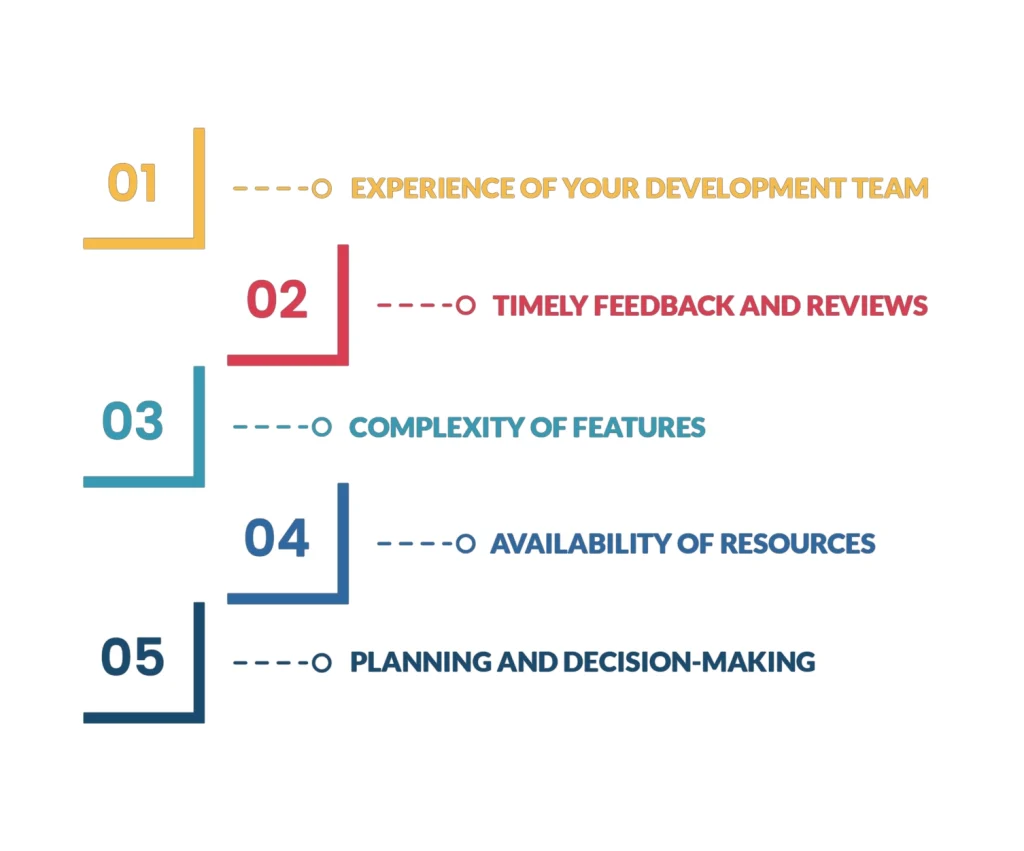
1. Experience of Your Development Team
The experience level of the development team has a direct impact on delivery speed and code quality. If your team is inexperienced, they will take longer to implement features correctly and may need extra revisions along the way.
Less experienced teams often take longer to implement features and may require additional revisions. This increases development time and overall cost.
You should pick developers with a proven track record in mobile apps. Experienced teams can foresee potential problems and complete tasks faster.
2. Timely Feedback and Reviews
Delays often occur when feedback is shared too late in the process. Late feedback forces teams to redo completed work, which extends timelines.
To prevent this, give feedback early and often. Frequent reviews keep the project on track and reduce the need for major changes later.
3. Complexity of Features
Feature complexity plays a major role in development timelines. Simple apps with basic functionality can be built quickly, while apps that handle payments, integrations, or sensitive data require more time and testing.
So, you should focus on core features first. You can also consider launching a Minimum Viable Product (MVP) of your mobile app to reduce initial development time while still delivering value.
4. Availability of Resources
Team size affects how quickly tasks can be completed. Larger teams can work on multiple features at the same time, while smaller teams move at a slower pace.
5. Planning and Decision-Making
Poor planning leads to frequent changes during development. This results in rework, delays, and higher costs.
Take the time to define your goals, features, and milestones clearly. Careful planning upfront saves weeks of revisions down the road.
How to Speed Up Your Mobile App Development Timeline
Speeding up mobile app development requires smart decisions at every stage of the process. The goal is to reduce waste, improve coordination, and focus on what matters most.
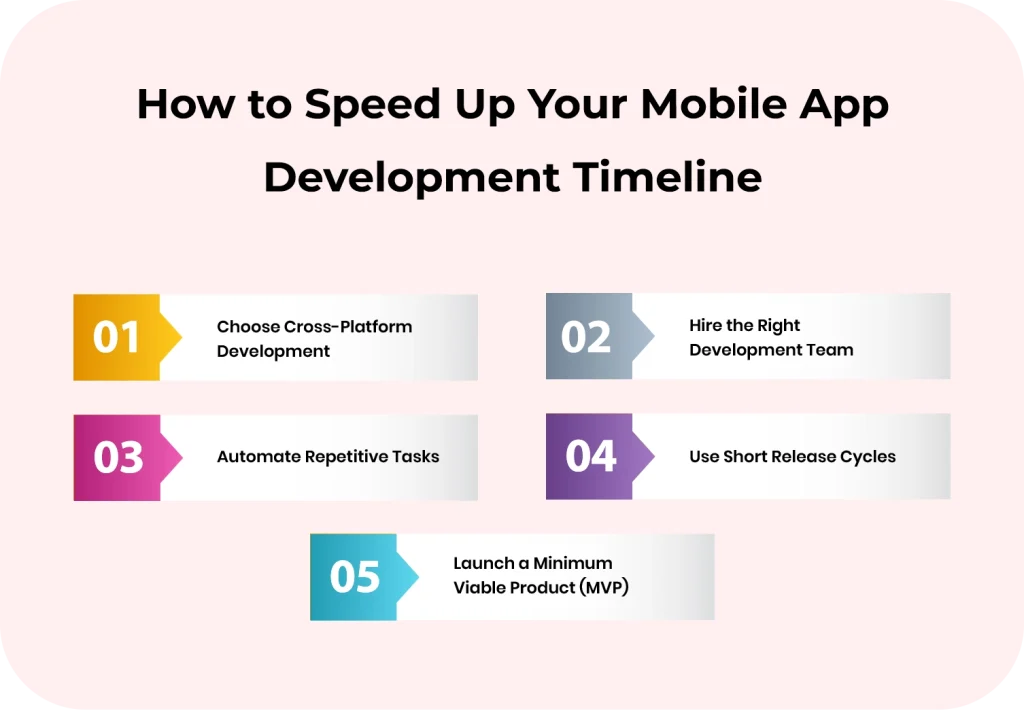
1. Choose Cross-Platform Development
Building separate mobile apps for iOS and Android can double the work and the cost. Cross-platform or hybrid development allows you to write one set of code for both platforms. This saves you significant time and resources.
Cross platform development allows teams to build one codebase for multiple platforms, reducing development time and cost.
2. Hire the Right Development Team
Having a skilled team to build your mobile app is crucial. Experienced devs know how to avoid these common pitfalls and keep the project on schedule.
A skilled development team can prevent common delays and keep the project on schedule. It’s an investment in quality and speed. A capable team can deliver your app on time or even ahead of schedule, and the workflow will be much smoother.
3. Automate Repetitive Tasks
Automation reduces manual effort and speeds up repetitive processes such as testing and deployment. Be it testing, builds, or deployment, using automation tools can run multiple processes simultaneously that would normally take days or weeks.
By automating early in the project, you reduce errors, speed up testing, and free your team to focus on the features that matter most.
4. Use Short Release Cycles
Instead of building everything at once, you can break the mobile app into smaller features and release them in short cycles. Doing this helps you to test individual features quickly, make changes without affecting the entire app, and prioritize updates based on real feedback.
Short release cycles allow teams to test features quickly and make improvements without affecting the entire app.
5. Launch a Minimum Viable Product (MVP)
You don’t need every feature at launch. Start with an MVP that covers the core functionality of your app.
Launching an MVP allows teams to validate ideas early, gather user feedback, and avoid spending time on unnecessary features.
Making an MVP lets you learn from real users, improve gradually, and avoid spending months on features that may not be essential.
Understanding the Mobile App Development Timeline
Building a mobile app requires more than development effort. It requires a clear timeline, realistic planning, and structured execution. Each stage, from discovery to deployment, affects cost, delivery speed, and product quality. When teams understand how long each phase takes and plan accordingly, they avoid delays, reduce rework, and maintain control over the project. A well defined mobile app development timeline helps businesses align teams, manage resources effectively, and deliver stable apps that meet user and business expectations.
Frequently Asked Questions
How long does it usually take to build a mobile app?
It really depends on how complex your app is. A simple app, like a calculator, can be ready in about 2 months. Medium apps, such as a social media platform, usually take 6 to 7 months. And if you’re building something complex, like a fintech app, it could take 10 months or even longer. The key is planning ahead and knowing which features matter most.
Is there a way to speed up mobile app development?
Yes, there are smart ways to save time without cutting corners. You can focus on the must-have features first, try cross-platform development, automate repetitive tasks, and release updates in short cycles. Starting with a Minimum Viable Product (MVP) is also a great way to get your app to users faster while improving it along the way.
What usually causes delays in mobile app development?
Delays often happen when the team is inexperienced, feedback comes too late, features are too complex, or there aren’t enough resources. Rushing decisions or skipping steps can also add weeks to the timeline. When you are aware of these potential roadblocks ahead of time, it can help you set realistic expectations and stay on track.