
A web portal is a solution that helps businesses create a structured online space where users can access information, services, or tools in one place. Unlike a regular website, a web portal often offers a more personalized experience based on the user.
The main difference between a website and a web portal is how users interact with it. Websites usually share the same content with everyone, while web portals provide a single point of access through a login, where users can see content or features tailored to them.
Whether a business wants to sell products, offer services, or manage internal operations like employee workflows, a web portal makes it easier to organize everything in one place. It also helps build stronger, long-term relationships by giving users a more controlled and relevant experience.
Common Types of Web Portals
Different businesses use different types of web portals based on their goals. Some focus on customers, while others are built for employees, partners, or communities. Let’s look at the most common types in simple terms.
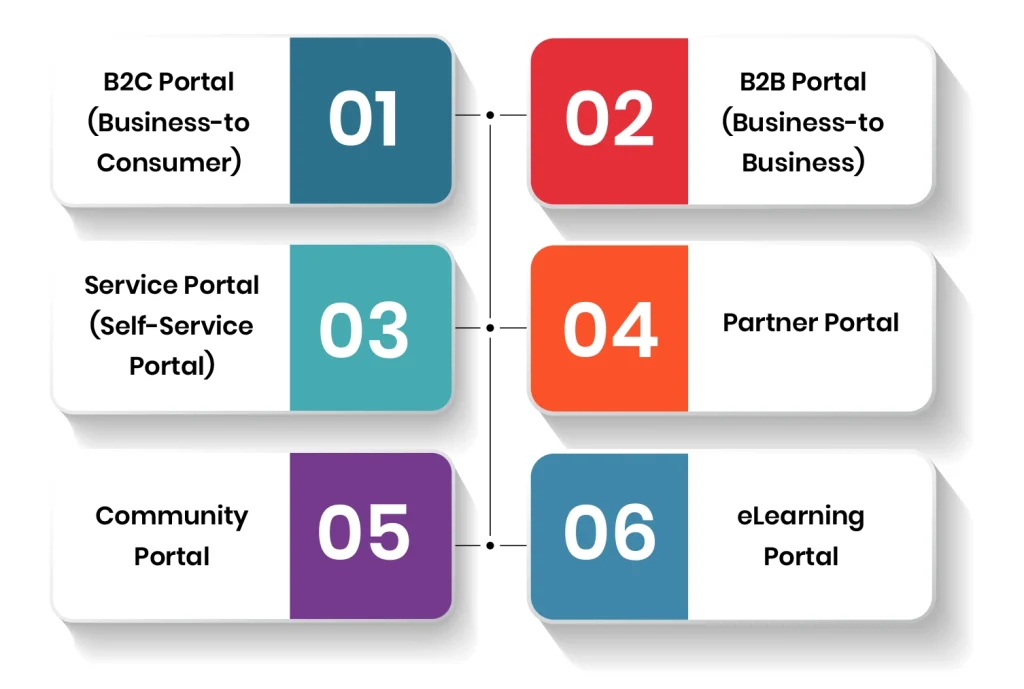
B2C Portal (Business-to-Consumer)
A B2C portal is designed for everyday customers. It focuses on making the buying process smooth and simple, whether it is discovering a product or completing the purchase.
These portals are commonly used in eCommerce businesses where user experience matters the most. Features like easy navigation, secure checkout, and order tracking help improve customer satisfaction.
Example: Amazon, Daraz
Best Practice: Allow users to either check out quickly or create an account. While quick checkout improves convenience, accounts help users track orders, save preferences, and access special deals.
B2B Portal (Business-to-Business)
A B2B portal is used when businesses sell products or services to other businesses. These portals handle more complex transactions and usually involve multiple decision-makers.
Unlike B2C, the buying process here is longer and requires detailed information, pricing options, and communication tools.
Example: Alibaba, wholesale supplier portals, etc
Best Practice: For a reliable b2b portal, the focus should be on personalization and clear communication. Instead of basic chat features, offer structured ways for clients to request quotes, manage orders, and stay connected.
Service Portal (Self-Service Portal)
A service portal allows users to solve problems or access services on their own without needing direct support. Everything is organized in one place to save time and effort.
These portals are widely used by companies, hospitals, and government systems.
Examples: Customer support portals, Employee HR portals, Patient portals and Government service websites
Best Practice: For the self-service portal, it is important to keep the user interface easy to navigate so users can quickly find what they need without confusion.
Partner Portal
A partner portal is built for businesses that work with third-party partners, resellers, or distributors. It helps manage relationships and gives partners the tools they need to sell better.
These portals often include training materials, product details, and sales tools.
Example: Company reseller dashboards
Best Practice: It is crucial that the portal provide useful resources such as product guides, pricing tools, and order tracking to effectively support your partners.
Community Portal
A community portal connects users and allows them to interact, share feedback, and discuss topics related to a brand or service.
It helps firms understand their audience better and build stronger engagement.
Example: Online forums, brand communities
Best Practice: Add features like discussion boards, polls, and rewards to keep users active and involved.
eLearning Portal
An eLearning portal is used for online education and training. It allows users to access courses, videos, and learning materials anytime.
Businesses also use these portals to train employees and reduce the cost of in-person training.
Examples: Coursera, Khan Academy, company training portals
Best Practice: Offer different types of content like videos, quizzes, and reading materials to suit different learning styles.
How Much Does It Cost To Build A Web Portal?
The cost of building a web portal depends on how complex it is, the features you need, and the team you hire. A basic web portal with simple login, dashboard, and user management can cost around $10,000 to $25,000. A mid-level portal with features like payment integration, APIs, and role-based access usually ranges between $25,000 and $70,000. For advanced portals such as B2B platforms or large enterprise systems with high security and custom workflows, the cost can go from $70,000 to $150,000 or more.
You also need to plan for ongoing costs. Maintenance, updates, and support usually cost around 15% to 25% of the original development cost each year. This includes bug fixes, security updates, and small improvements. As your portal grows and you add more features, these costs can increase over time.
How Long Does It Take To Develop A Web Portal?
The time required to build a web portal depends on its size and complexity. A basic web portal with simple features can take around 2-3 months to complete. Moreover, a medium-sized web portal with more integrations and custom features usually takes 3-6 months. Whereas, more complex web portals such as B2B or enterprise systems can take approx 6-12 months or even longer. Specifically, when they involve multiple user roles and advanced security.
The development process usually includes planning, design, development, testing, and launch. So, with regular user testing, bug fixes, and integrations taking longer than expected, and timelines can extend. To avoid delays, it helps to define clear goals early and work with a team that follows a structured process.
Final Words
In the end, choosing the right type of web portal depends on what your business requirements are. Whether you are building a B2B platform, a customer portal, or an internal system for employees, the goal is the same. Make it user-intuitive, information should be easy to access, improve user experience, and simplify daily operations.
If you are planning to make a web portal, focus on getting the structure and features right from the start. A well-designed portal is not just a digital tool. It becomes a long-term system that supports your growth, improves efficiency, and helps you build stronger relationships with your users.
At Linkitsoft, we help businesses design and develop custom web portals tailored to their needs. If you are looking to build a secure, scalable, and easy-to-use portal, contact us, and let’s bring your idea to life.