

Modern machines are becoming more automated and intelligent, but they still require a clear and simple way for humans to monitor and control them. This is where HMI (Human-Machine Interface) comes in. It acts as a communication layer between people and machines, converting complex operational data into easy-to-understand visual interfaces.
In this blog, we will explore what HMI software development is, how it works at a system level, its core components, key features, common industrial integrations, and where it is used in real-world environments. We will also understand the key factors that make an HMI system effective in modern industrial operations.
What HMI Software Development Means
HMI software development refers to the process of designing and building systems that enable interaction between humans and machines through visual and interactive interfaces. Instead of working with complex machine-level commands, operators use screens, controls, and dashboards to monitor and manage industrial equipment.
At a system level, HMI software acts as an interface layer between the operator and the machine control system. It collects data from machines, processes it, and presents it in a structured visual format such as charts, status indicators, and alerts. At the same time, it also sends user commands back to the machine system for execution.
HMI software is commonly used in environments where machines operate continuously and require precise control, such as manufacturing lines, energy systems, industrial automation setups, and automotive production units. Its main purpose is to improve visibility, reduce operational complexity, and support faster decision-making on the ground.
Architecture of HMI Systems
HMI software enables communication between an operator and a Programmable Logic Controller (PLC) that manages industrial machinery. When an operator sends a command through the HMI interface, the request is processed by the PLC, which executes the required action on the equipment.
Once the action is performed, sensors or connected devices send updated status data back to the PLC. This data is then displayed on the HMI system for real-time monitoring and control.
In advanced setups, HMI systems are integrated with cloud platforms using Web APIs. This enables remote access, centralized data management, and integration with SCADA systems for broader industrial supervision.
What are the Key Features of HMI Software?
HMI software involves several important features that help operators control machines, monitor performance, and respond to issues in real time. These features are designed to enhance efficiency, safety, and overall system visibility for the affected stakeholders.
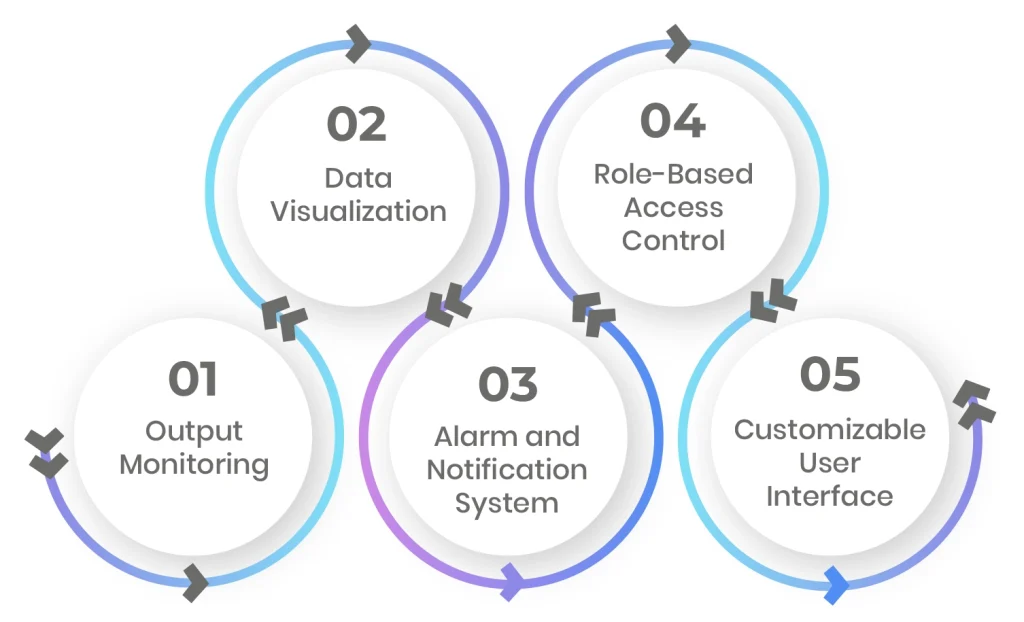
Output Monitoring
One of the core features of HMI software is real-time monitoring. This feature lets operators see live machine data as it is happening. This includes performance levels, production status, and system health.
With real-time updates, operators can quickly detect issues and take action before they turn into bigger problems.
Data Visualization
HMI systems convert complex machine data into simple visual formats. Instead of reading raw numbers, users can view graphs, charts, and status indicators.
This makes it easier to understand machine behavior at a glance and reduces the chances of misinterpretation.
Alarm and Notification System
HMI software includes built-in alert systems that notify operators when something goes wrong. These alerts can appear as on-screen messages, sounds, or visual warnings.
This helps teams respond quickly to errors, system failures, or unusual machine behavior, reducing downtime and damage.
Role-Based Access Control
Security is an important part of HMI systems. Role-based access control ensures that each user only has access to the data and functions relevant to their role.
For example, an operator may control machines, while a manager can only view performance reports. This helps maintain system safety and prevents unauthorized changes.
Customizable User Interface
HMI software allows users to customize their dashboards based on their unique needs. Operators can arrange screens, choose what data to display, and focus on the most important controls.
This improves usability and helps reduce confusion during daily operations.
What Makes an HMI System Effective?
The effectiveness of an HMI system depends on three major aspects. One is how quickly operators can understand machine status and respond to changes. In industrial environments, clear and immediate visibility of system behavior is essential for stable operations.
Second is an effective HMI design that follows structured principles such as ISA-101. This focuses on reducing unnecessary visual load and keeping only relevant operational data on screen. Thirdly, the interface should guide attention toward critical conditions while maintaining a clean and stable display for normal operations.
Where HMI Software Is Used?
HMI systems are used in many industries where machines and automation play a central role.
In manufacturing, HMI software helps control production lines and monitor machine performance. In the energy sector, it is used to manage power plants, electrical grids, and monitoring systems. In automotives, HMI systems support assembly lines and robotic operations. Healthcare equipment also uses HMI interfaces to help medical staff operate machines safely and accurately.
Across all these industries, the goal remains the same. And that is to make complex systems easier to control and monitor.
System Integrations in HMI Development
HMI software connects with industrial and enterprise systems to enable control, monitoring, and data exchange across multiple operational levels.
- PLC integration is used for direct machine control. HMI communicates with PLC through Ethernet in small systems or Web APIs in large-scale setups. The PLC executes machine instructions, while the HMI reads and displays real-time operational data.
- SCADA integration is used for system-wide supervision. Multiple HMI units are linked through SCADA to enable centralized monitoring of machines across production lines or facilities.
- ERP integration is used for operational data transfer. HMI sends machine usage data, production logs, and operator activity records to ERP systems for analysis of efficiency and resource planning.
These integrations establish data flow between machine control systems and enterprise-level platforms.
What is the Cost and Timeline of HMI Software Development?
The cost of developing HMI software depends on the complexity of the system, required features, and level of integration with other platforms.
A basic HMI system can cost around $50,000 to $60,000. Mid-level systems with more advanced controls, integrations, and dashboards may range from $100,000 to $300,000. Large-scale industrial solutions with complex workflows and multiple integrations can go beyond $300,000.
The development timeline also varies. Simple systems may take around 5 to 7 weeks, while more advanced solutions can take 6 to 12 months or longer, depending on testing, hardware integration, and customization needs.
Still Thinking About a Custom HMI Solution for Your Business?
Most off-the-shelf HMI software looks ready to use at first, but in real industrial environments, it often needs heavy customization to match specific workflows, machine setups, and system integrations. This usually leads to extra implementation effort, integration challenges, and limits in adapting the system to real operational needs.
With a custom HMI solution, you get full control over system design, integration with PLC, SCADA, and ERP environments, and an interface built around actual operator workflows. It also allows better alignment with performance requirements, scalability needs, and long-term industrial operations.
At Linkitsoft, we build custom HMI software solutions tailored to industrial systems and operational requirements. If you are planning a scalable and well-integrated HMI system, connect with us to discuss your project.